
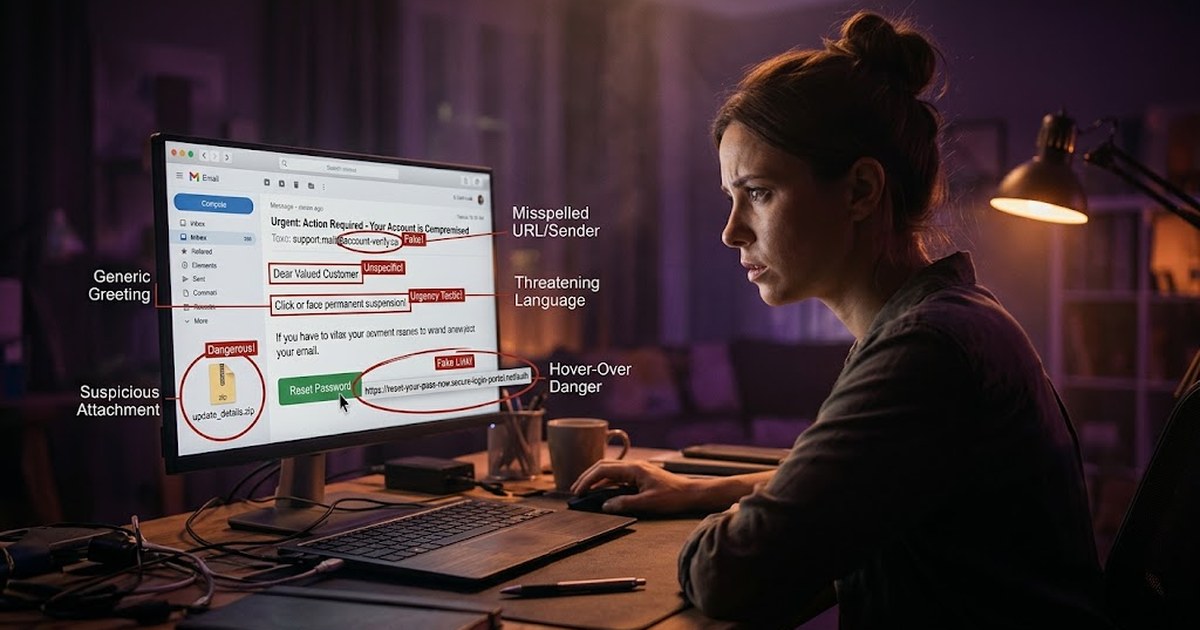
You've got a new email. The subject line makes your stomach drop a little — "Unusual Sign-In Activity Detected." Your thumb is already moving toward the link before your brain has finished reading the sentence. That half-second gap, between seeing and thinking, is exactly where phishing attacks live.
Phishing hasn't gone away — it's just gotten quieter. The obvious scams full of typos and "Nigerian prince" energy are mostly gone. What's replaced them are messages that look, sound, and feel almost exactly like the real thing. Almost.
Here are five signs worth training your eye to catch, before your thumb catches up with your instincts.
1. The urgency trap
Real organizations rarely need you to act in the next ten minutes. Phishing messages, on the other hand, are built entirely around urgency: "Your account will be suspended," "Payment failed — update now," "Suspicious login — verify immediately."
Urgency is a deliberate design choice. It's meant to trigger a reaction before your critical thinking catches up. When a message pushes you to act right now, treat that pressure itself as the red flag — not just the request inside it.
2. Sender details that don't quite add up
Look past the display name. "PayPal Support" can sit in front of almost any email address — that's just text the sender typed in. What matters is the actual address after the @ symbol.
Watch for near-matches: support@paypa1.com instead of paypal.com, or a correct company name paired with a completely unrelated domain. These small substitutions are easy to miss at a glance — which is exactly the point.
3. Links that don't match their label
A link's visible text and its actual destination can be two completely different things. "Click here to verify your account" might display as friendly, familiar text, while the underlying URL points somewhere else entirely.
- On desktop, hover over a link (without clicking) to preview the real destination in your browser's status bar.
- On mobile, press and hold the link to see a preview before opening it.
- Check the domain carefully — attackers often use subdomains or extra words to make a fake link look related to the real company (e.g.
paypal.security-check.netis not a PayPal domain, even though "paypal" appears in it).
4. Requests that skip the normal process
Phishing often asks you to do something slightly outside your organization's usual workflow — pay an invoice through an unfamiliar method, reply with a password "for verification," or approve a request through a channel your company doesn't normally use.
If a request feels like it's routing around your usual checks, that's worth pausing on. Legitimate processes rarely need to bypass themselves.
5. Unexpected attachments, especially unusual file types
A surprise invoice, shipping label, or "voicemail" attachment you weren't expecting is one of the oldest tricks that still works because it plays on curiosity rather than fear. Be especially cautious with .zip, .exe, .js, or macro-enabled Office files (.docm, .xlsm) arriving from someone you weren't expecting to hear from.
What to do when you spot these signs
- Don't click, reply, or download — just pause.
- Verify through a separate, known channel: call the company using a number from their official website, not one provided in the message.
- Check the sender's full address and hover over links before trusting them.
- Report it — most email clients and workplaces have a "Report Phishing" option; using it helps protect others too.
- If you've already clicked, don't panic — change the relevant password immediately and enable multi-factor authentication if it isn't already on.
None of these five signs require technical expertise to spot. They require a habit: a half-second pause before you click, reply, or download. That pause is the single most effective phishing defense that exists — more effective than almost any filter or tool, because it works on the one thing attackers are actually trying to exploit: a rushed decision.
Recognizing these patterns won't make you paranoid about every email in your inbox. It just means the next time something asks you to act fast, you'll know exactly what to check first.